As a self-published author, I thought I would share what I have learned.
Contact Henrik for availability to present this topic again.
As a self-published author, I thought I would share what I have learned.
Contact Henrik for availability to present this topic again.
Contact Henrik for availability to present this topic again.
For more, check out Slideshare
Disclosure: Links to other sites may be affiliate links that generate us a small commission at no extra cost to you.
The past several books I have written have all been on very niche topics that are not visual at all. These are complex, niche topics which many people do not understand and are not familiar household terms nor concepts.
So the challenge is how do I design book covers that are visually simple and eye-catching?
Here are four examples:

While this project started with a podcast series that later transcribed and funded through a Kickstarter project, the [older] logo for the podcast was incorporated on the cover. The designer added part of a word cloud as the background and rubber stamped “transcribed.” The word cloud seen in the background was used throughout the interior of the book layout thanks to the Designer.
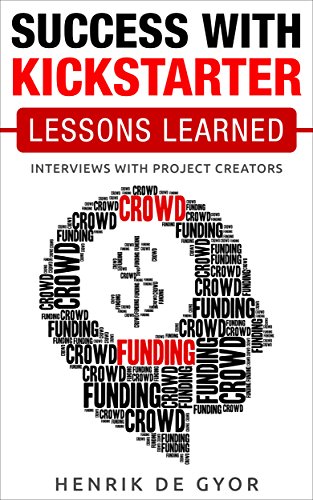
Since I had success with Kickstarter and interviewed several other project creators who had even bigger successes with Kickstarter, I found the artist of this word cloud on a stock photography website under “crowdfunding” which the category of Kickstarter. A similar image was found online had the head facing left, so I contacted this artist via email and asked if he could design it facing right with the direction the text read in English is from left to right. The illustrator created this word cloud of a human head with money in mind.

Rights Management is commonly a hard topic to visualise about intellectual property licensing, permissions and copyright. It can be challenging to make visually stimulating. There are very few books on this topic, and covers are often quite dull. This is a bit less dull.

The Blockchain is another topic that is not very visual. Blockchain itself about algorithms, hashes, distributed ledgers, and policies, but I discuss the practice uses of this technology. I commissioned the same artist that created the cover for Success with Kickstarter to create a new image with using a bitcoin logo that was overused in this field and not the basis for this book.
My co-author wanted something was emotionally charging. I wanted something clean, simple and eye-catching.We definitely talk about money as the subtitle says. However, this book unpacks blockchain well beyond the simple model of using it as a cryptocurrency and reviews the other cases of how it can radically change the world as we know it. This is why the visual reference on the cover is reduced to just two characters: >$
I will let you think about these two symbols together so you can find out more in the book in case you want your mind blown. Greater than dollars. Beyond money. My co-author came up with the title and was focused on the money generated around Blockchain. I was interested in the billions of people Blockchain technology could effect.
Relevant keywords were supplied to the Illustrator to incorporate into this word cloud, which he scaled to size to form these two characters.

This image is the cover art for the Blockchain Billions podcast which is also available on iTunes.
The last three books listed above were all created were launched within 4 months of each other, but took at least 6 months each to create plus months of research before starting each book project. If you are interested in hearing how I did it, let me know, and I will blog about it here. I will only blog about it if there is an audience who wants to read about it. Look forward to your comments.
Disclosure: Links to other sites may be affiliate links that generate us a small commission at no extra cost to you.
How many sets of 24 hours do you have each day? One
So why should we use multiple calendars for scheduling all of our events?
Segment your time between work, personal (alone), family and friends with your schedule.
Yes, you can schedule your family and friends unless you find another 24 hour period per day.
Everyone has 24 hours per day, 1440 minutes per day and 168 hours per week.
What do you do with your time?
How do you use each hour of your life? Too many don’t care and waste it.
We are either productive or not.
We move the needle toward accomplishment or not.
We move the needle toward our own fulfillment or not.
I believe if I did not accomplish something every day, the day is wasted and that is hurtful to at least one person. You.
Even if I am sick or on vacation, that is not an excuse.
How many calendars and scheduling tools do you use to track your time, all your meetings (personal/professional), all your calls and everything else in your day?
I know too many people who use nothing for their own personal schedule and a work schedule applied by their workplace. That is not time tracking nor time management.
Without time management, we create excuses like “I am so busy” or “I don’t have time”.
The fact is we choose how we spend our time. We choose when we get up and go to bed. We choose when we eat. We even choose when we go to the bathroom.
There is plenty of time management advice about focusing on 1 thing or top 3 things per day.
I take a different approach.
Use one calendar for all of my time. Google Calendar follows me everywhere for all of my time.
Forget paper calendars. I know too many people who repeatedly lose their little agenda or don’t even travel with it. Which makes it a useless afterthought.
Hanging in my office is a really nice, big paper wall calendar which was designed by the late Massimo Vignelli. It is very nice decor, but I do not use it.
When you need to shift your calendar events because someone reschedules, how do you handle that?
Simply confirm a new date/time and drag the existing event to the new date/time on Google Calendar. Done.
A calendar change takes one finger on your smartphone. Yes, you can play “Calendar Tetris” by moving calendar time blocks as needed.
If the calendar tool we use is inflexible and cannot handle iteration, change the calendar you are using. Do not wait for change to happen to you. Seek it ahead of the change so you understand it better than after it happens to you. No whining. No excuses. Use your time more wisely. We can all make the time we need based on our own priorities. After all, it is your time. All 168 hours every week. How are you using your time?
Want to know how I schedule meetings and save time doing so? Read this.

Disclosure: Links to other sites may be affiliate links that generate us a small commission at no extra cost to you.
Since I travel up to 100 days a year, I usually travel at night so I waste less of the 24 hours.
Night time is often sleep time. How do I sleep on a plane, train, bus or car?
 Henrik de Gyor